Preflight Dispatch #4: October, 2026
It’s been a little while since the last update.. but we’re back! There’s plenty happening, and we’ll share more as it makes its way into Preflight.
For this update, here are a few recent additions to the auditing engine. They’re small checks, but should help catch some things that can be easy to miss when reviewing an email.
Advisories in Email Insights
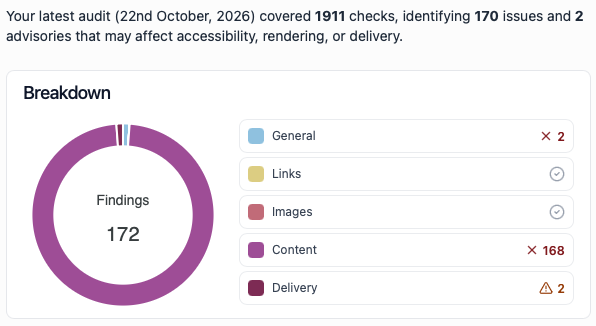
Email Insights now shows advisories alongside failures. Think of failures as things that look broken, and advisories as a friendly nudge to take another look. Seeing both together makes it easier to spot what needs fixing and what might simply be worth checking, without digging through the full audit.
Additional email checks
Copy / Link checks
Vague link text
We now try to warn when a link uses vague text such as “Read more”. It isn’t always wrong, but a more descriptive link can help people understand where it will take them, especially when links are read out of context by a screen reader.
For example, “Read the full guide” or “See the 5 ways to cut your bill” gives the reader a clearer idea of what to expect when they click.
Tracking links
We now check supported tracking details in links: Google Analytics campaign
parameters (UTMs), Google Ads click IDs (gclid, gbraid, and wbraid), and
Microsoft Advertising’s msclkid. This helps catch problems with these values
before they affect campaign reporting. Custom tracking and email-provider click
tracking aren’t checked.
Copyright year
We now warn when a copyright notice in your email doesn’t include the current year. It’s an easy detail to miss in a footer, especially when reusing an email from a previous year, so this check gives you a reminder to review it before sending.
Keep your code tidy and reduce its size
Unused JavaScript
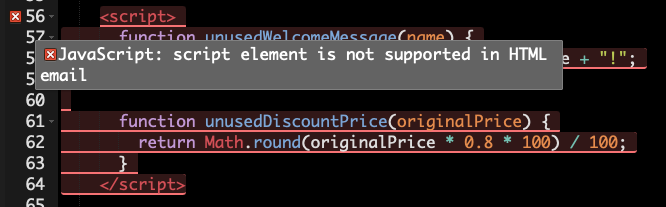
We now fail a check if we find JavaScript in an email. Emails aren’t web pages, and email apps generally don’t run scripts, so JavaScript won’t work the way it might on a website. This helps catch leftover or unexpected script code before you send.
Unused CSS
We now flag selectors in an email’s embedded styles when no elements in the email’s HTML match them.

Image checks
Insecure image URLs
We now flag remote images that are loaded insecurely. For example, their URLs
begin with HTTP:// instead of HTTPS://. Using a secure URL
helps avoid mixed-content issues and gives you a nudge to check image links
copied from an older source.
Secure HTTPS:// images are fine, and images embedded in the email
using CID: or DATA: aren’t affected by this check.
Image dimensions
We also now warn when an image’s source dimensions are substantially larger than the size it is displayed at in the email. The check looks at both width and height, and compares against the largest visible size across the captured viewports, so an image that only shrinks on mobile won’t be flagged.
This is separate from the existing image file-size check. It helps spot images that could be resized before being added to an email, without relying on file size alone.
Other Updates
We’ve also added a side-by-side comparison of email QA tools to make it easier to see how Preflight’s checks compare with other options.
Ready to catch issues before you send?
See real screenshots, review accessibility findings, and check delivery signals in one place.
Try Preflight free for 14 daysNo charge today. Cancel anytime before your trial ends.