Test your email in forced dark mode
Mark Robbins posted on LinkedIn a great explainer video about Chromium’s Algorithmic Darkening (forced dark mode). And how popular Android email clients like Gmail, Samsung email, Yahoo, Aol, GMX apps all appear to implement forced dark mode using this functionality.
We already provide screenshots of how your email will render across Mobile, Tablet, and Desktop viewports within the latest version of Chrome. And now you can also see renders of your email in those same viewports, but with the forced dark mode settings applied.
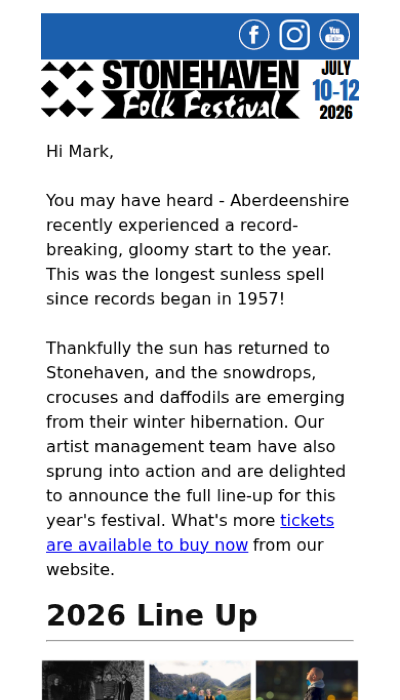
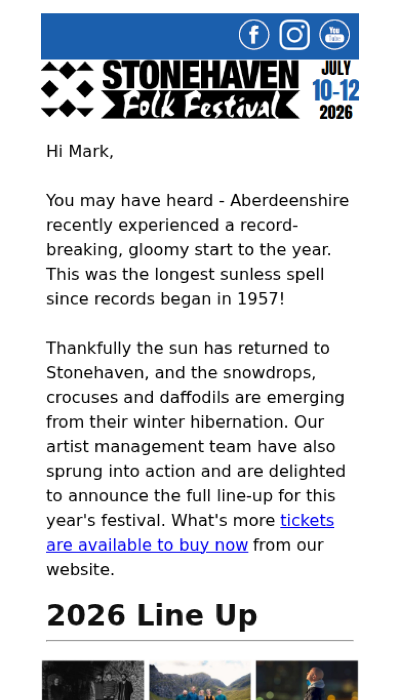
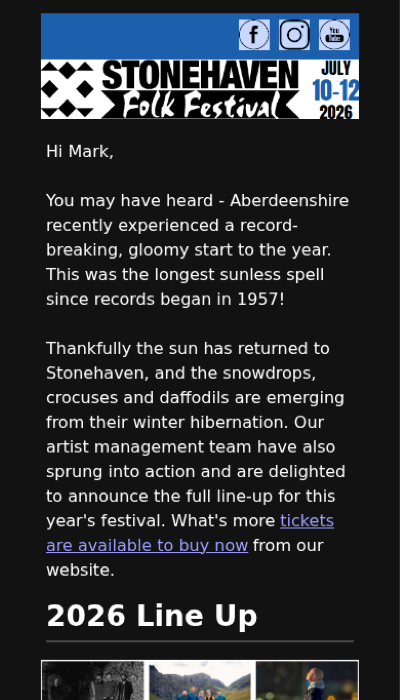
The above example is an email I received the other day from Stonehaven Folk Festival. The email doesn’t have any dark mode styles, so when viewing using system dark mode preferences, we can see that it remains black on white text.
With the Forced dark mode rendering, we now see how Chromium’s algorithmic darkening substantially changes the look of an email. The background and text colours are now inverted. And in some situations the darkening will also invert the colours of images which can substantially impact the look of your email.
Ready to test every email with more confidence?
See real email app screenshots, spot accessibility issues, and catch problems before you send.
Try Preflight free for 14 daysNo charge today. Cancel anytime before your trial ends.